怎么使网页中的文字在底部居中显示?

 时间:2026-04-24 11:38:51

1、创建一个div:

<div >

 </div>

怎么使网页中的文字在底部居中显示?

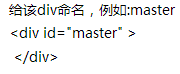
2、给该div命名,例如:master

<div id="master" >

 </div>
怎么使网页中的文字在底部居中显示?

3、输入要居中显示的文字,例如:©2017 HZW

<div id="master" >

©2017 HZW

 </div>

怎么使网页中的文字在底部居中显示?

4、添加style标签

<style type="text/css" >

 </style>

怎么使网页中的文字在底部居中显示?

5、在标签中添加样式:

<style type="text/css" >

 #master {

       position:absolute;

      left:50%;

      bottom:0;

      text-align :center;

        }

 </style>

怎么使网页中的文字在底部居中显示?

6、设置成功

怎么使网页中的文字在底部居中显示?

  • 如何在HTML中插入图片
  • html5如何设置表单的文本框不能为空
  • html怎么让内容置底
  • html如何把两个网页连接起来
  • HTML中引入css和js的方法
  • 热门搜索
    自然堂隔离霜怎么样 车辆折旧费怎么算 二手车怎么过户 bounce怎么读 辽宁大学怎么样 牙齿怎么变白 昆明怎么去西双版纳 三菱汽车怎么样 胃不好怎么办 win7安全模式怎么进
